
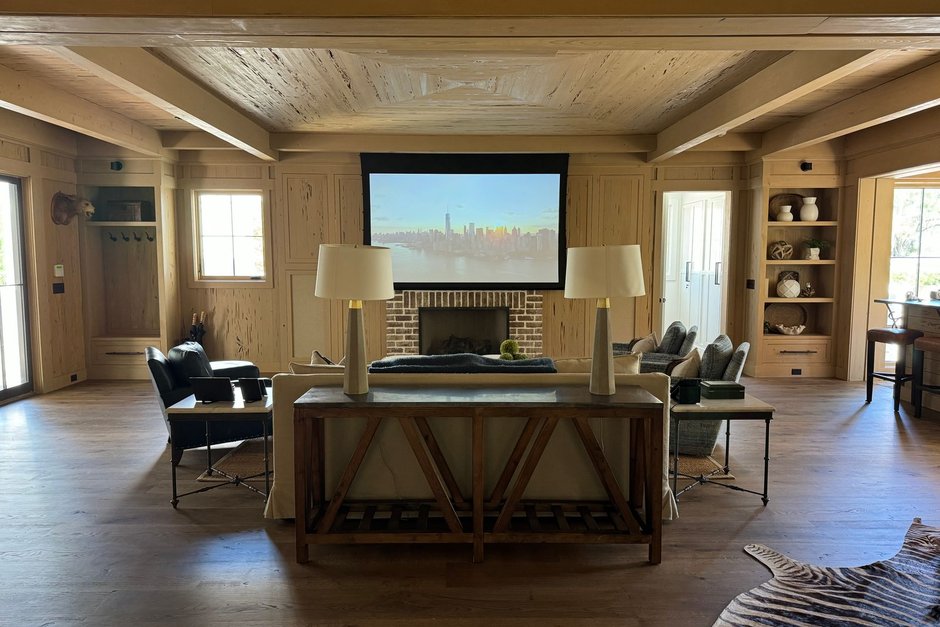
If your website has one page called “home theater” that covers everything from hanging a TV to building a full cinema room, Google will mostly send you TV mounting jobs. Those are the easiest searches to match and the cheapest jobs to win. The dedicated theater and media room projects that keep a crew busy for weeks end up going to the installer down the road who gave them their own pages.
That is the core problem with most home theater installer SEO we see. The owner wants the big builds, but the site is written like a menu board. Google can’t tell which work you actually want, so it matches you to the most common search it can find, and that search is usually “tv mounting service near me.”
This guide walks through the fix in the order you would do it. You sort your services by project size, build a separate page for each tier, prove the big jobs with real room builds, and point your builder and designer pages at the high-ticket work.
Why one home theater page attracts the wrong jobs
A homeowner searching “tv mounting service near me” wants something done this week, for a modest price, by whoever answers first. A homeowner searching “dedicated home theater installation” is planning a room. They might be finishing a basement, building a new house or converting a bonus room. They will compare several installers, look at past work and talk to you more than once before signing.
Those are different people with different questions. When both land on the same page, the page can’t serve either one well. The mounting customer has to scroll past talk of acoustic treatment and projector throw distance. The theater customer sees a wall-mount price list at the top and assumes you are a handyman with a drill.
Google notices how people behave on your page and what the page is mostly about. If most of your words, photos and headings are about TVs on walls, that is what you will rank for. The big-room searches have fewer people typing them, so they are easy to ignore. But each one is worth far more to your business than a mount.
The goal is not to drop TV mounting. It brings steady calls, keeps techs busy between projects and turns into referrals. The goal is to give each kind of job its own page, so each page can win the search it was built for.
Map your services by project size before you touch the site
Before anyone writes a page, sit down with your project list from the past year or two and sort it. Most AV installers end up with three or four tiers that look something like this:
- Quick installs: TV mounting, soundbar setup, wire concealment, streaming device setup.
- Living room and media room upgrades: surround sound in an existing room, in-wall or in-ceiling speakers, lighting control, a media room that is still used as a family room.
- Dedicated home theaters: a room built only for watching, with a projector or large display, tiered seating, acoustic treatment, light control and a full speaker layout.
- Whole-home and networking work: multi-room audio, Wi-Fi, control systems. This may be its own section of the site or folded into the theater pages, depending on how you sell it.
Then follow these steps to turn that list into a page plan:
- List every service you offer and assign each one to a tier. If something fits two tiers, put it where you would rather sell it.
- For each tier, write down the words customers actually use when they call or fill out a form. “Media room,” “theater room,” “basement theater,” “surround sound install” and “TV wall mount” are all different searches.
- Pick one main page per tier and give it one clear focus. The quick-install page targets TV mounting. The media room page targets media room design and installation. The theater page targets dedicated home theater installation.
- Decide which cities or neighborhoods matter most for each tier. You might mount TVs across your whole metro area but only want theater builds in the higher-end suburbs and new-construction areas.
- Write down what a qualified inquiry looks like for each tier, so each page can ask the right questions on its form.
- Rename or redirect the old catch-all page so its existing rankings flow to the new theater page instead of disappearing. Your web person should set up a permanent redirect if the address changes.
- Add each service to your Google Business Profile services list using the same wording as your pages, so your profile and your site tell Google the same story.
Once this is mapped, the writing gets much easier, because each page has one job.
Write each page for the search behind it
Every page needs its own title tag, its own H1 and its own form questions. Here is what we put on each one.
The TV mounting page
Keep it fast and practical. Say what you mount, what wall types you handle, whether you hide cables in the wall, and how quickly you can schedule. Show clean finished photos. Make the phone number tappable and the form short.
Then add one quiet line near the bottom: if they are thinking about surround sound or a full room later, link to your media room page. Some mounting customers become theater clients, and this gives them a path without crowding the page.
The media room page
This page is for the “media room design installer” searcher. They want a room that looks good, sounds better than a TV alone and still works as a family space. Talk about speaker placement that doesn’t take over the room, hidden wiring, simple remotes or control systems, and lighting. Explain how you handle rooms with windows, open floor plans and furniture that can’t move. These are the real limits most media rooms face.
Ask on the form whether the room is existing or being built, and roughly when they want it done.
The dedicated home theater page
This is the page that pays the bills, so it should be the most detailed page on your site. Walk through your process from first site visit to calibration. Cover room planning, screen and projector selection, seating layout, sound isolation, acoustic treatment, light control, HVAC noise, and how you coordinate with the builder or electrician if the house is under construction.
Theater buyers want to know you have thought about the things they haven’t. A clear process section does more to earn a call than any amount of “premium experience” language.
The form here can ask more: room size, whether it is new construction or a remodel, the stage of the project and how they found you. People planning a large build are usually happy to answer, and it helps you prioritize callbacks.
If you want to see how these pages fit with the rest of your marketing, our page on SEO for home theater installers covers how we set this up for AV companies.
Show room builds with equipment and acoustic details
A gallery of dark rooms with glowing screens all looks the same. What separates you is the detail behind each build. For every theater or media room you have finished and have permission to show, create a short project page or case write-up. Cover:
- The starting point: an unfinished basement, a spare bedroom, a room in a house under construction.
- The client’s goals in their own terms: movie nights with the kids, a sports room, a quiet listening space.
- The equipment: projector or display, screen type, speaker layout, receiver or processor, seating. Use real brand and model names if you are comfortable sharing them. People search for those.
- The acoustic work: wall and ceiling treatment, bass management, sound isolation from the rest of the house, door seals, how you dealt with a noisy return vent.
- The problems you solved: a low ceiling, a support post in the wrong spot, a homeowners association rule about exterior work, a tight timeline before move-in.
- Photos at different stages, not just the finished shot. A framed room with wiring runs shows skill in a way a dark final photo can’t.
Each project page should link back to the main theater or media room page, and the main page should link to its best projects. That gives Google a clear group of pages about dedicated theater work, all pointing at the page you want to rank. Our internal link analyzer will show whether those links actually exist once the pages are live, because they often get lost when a site is rebuilt.
Name the town or neighborhood on each project page if the client agrees. “Basement theater in a new build in [suburb]” helps you show up in the areas where you want this work.
Home theater installer SEO for builder and designer referral pages
Many of the biggest theater jobs never start with a homeowner search. They start with a custom builder, an interior designer or an architect who needs an AV partner they can trust. Those people search too, and they check your site before they recommend you.
Build a page aimed squarely at them. Call it something like “For builders and designers” and write it in their language:
- When you need to be brought in during construction, such as before drywall for prewire, and what you need from them at each stage.
- How you coordinate with electricians, HVAC and framing crews.
- How you handle drawings, equipment rack locations and low-voltage plans.
- How you work around their design vision, for example hidden speakers, fabric walls that match the finishes, or equipment kept out of sight.
- Whether you work with the homeowner directly or through the builder, and how you handle billing.
- Your licensing and insurance, stated plainly, since many builders need this before they will put you on a job.
Link this page directly to your dedicated theater page and your best project write-ups. It should not link to your TV mounting page. A designer who lands here should only see work that matches the projects they would send you.
Then use the page. Send it to builders you already work with, add it to your email signature and link to it from your Houzz profile if you have one. When builders and designers link to you from their own sites or partner lists, those links point Google at the work you want most.
Finally, add structured data so Google reads your business and services clearly. Our local business schema generator gives your web person a starting point. And if you want the bigger picture on showing up in local results across your service area, see our local SEO services.
Frequently asked questions
Will I lose my TV mounting calls if I move that content off my main home theater page?
Not if you give it its own page and redirect properly. A focused TV mounting page usually matches mounting searches better than a mixed page did. The difference is that those searches stop pulling your theater page in the wrong direction.
Should I list prices on my dedicated home theater installation page?
Most installers don’t, because every room is different. You can explain what affects the cost, such as room size, new construction versus remodel, equipment level and acoustic work, without giving a number. That sets expectations and filters out people who are only looking for a quick install.
How many project write-ups do I need before the theater page starts to rank?
There isn’t a fixed number. Detail matters more than count. A few thorough write-ups with equipment, acoustic work and progress photos will do more than a large gallery with no text. Add a new one every time you finish a build you are proud of.
Is a media room page different enough from a theater page to need its own URL?
Yes, for most installers. People searching for a media room usually want a multi-use family space, while theater buyers want a dedicated room. The questions, photos and form fields differ, so the pages should too.
Can my builder and designer page also rank for homeowner searches?
It may pick up some, but that is not its job. Write it for trade partners and let your theater and media room pages handle homeowners. Mixing the two audiences repeats the original one-page problem.
What should I do with old blog posts that mix mounting and theater topics?
Update each one so it leans clearly toward one tier, then link it to the matching service page. If two old posts cover the same thing, merge them and redirect the weaker one.
Your next step
This week, pull your project list from the past year, sort every job into quick installs, media rooms and dedicated theaters, and write down the exact words those customers used when they first called you. That list becomes your page plan. If you want us to look at your site and show you which pages to split first, Call us+1 (415) 420-4059 or start with our free marketing audit.