
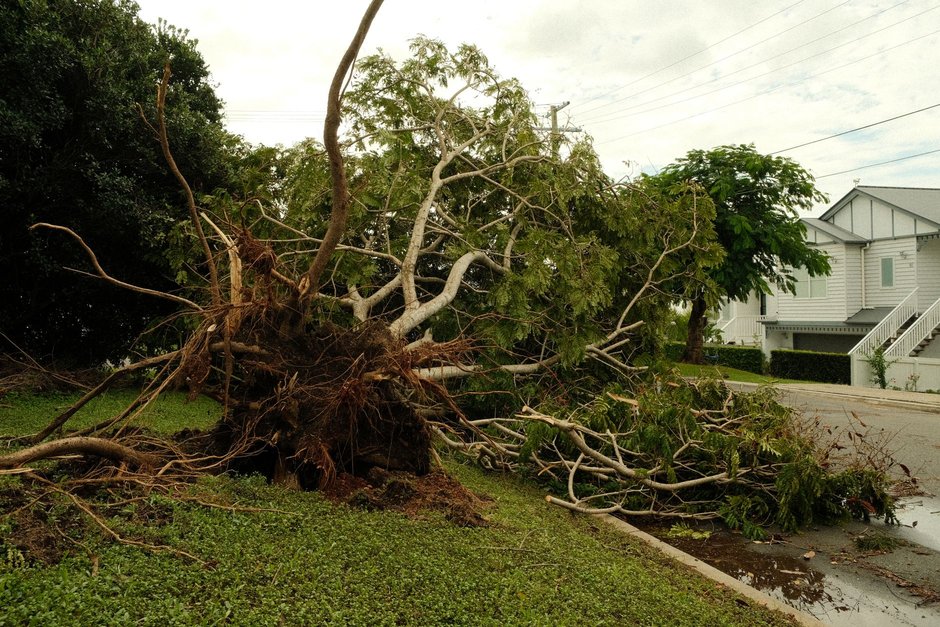
Most tree service websites lose emergency tree removal calls because the page a storm-night visitor lands on was built for someone pricing a pruning job in April. That visitor has a tree on the roof, water coming through the ceiling and a phone at low battery. If the page starts with a seasonal trimming offer and a long quote form, they go back to the search results and call the next company.
The fix is a separate page built for that one moment. It has a call button that sits under the thumb, plain wording about insurance and cranes, proof that you actually show up at night, and a form that sorts real emergencies from routine removals so your crew isn’t woken up for a dead pine that can wait until Tuesday.
This guide walks through that page in the order we would build it for a tree company. You can hand it to your web person as is.
What a homeowner with a tree on the house needs to see first
Start with the visitor, not the design. Someone searching “tree fell on house” or “24 hour tree service” at night has three questions, and they want the answers before they scroll:
- Can you come now, or at least tonight or first thing tomorrow?
- Can you handle a tree this big, on a structure, without making it worse?
- Will this be a fight with my insurance company?
Your routine removal page answers different questions: how much, how long, are you licensed and insured, can I see reviews. Those still matter, but they come second on a storm night. When the top of the page says “Free estimates on tree trimming and removal,” the emergency visitor reads it as “these people book appointments,” and they leave.
So the top of the emergency page should say what you do in plain words. Something like “Tree on your house, car or power line? We answer 24/7 and dispatch crews for storm damage tree removal across [your service area].” Then the call button. Nothing else needs to compete with it.
Building the tap-to-call layout for 24 hour tree service
Storm traffic is almost all phones. People are standing in the yard or sitting in a dark kitchen. Design for one thumb and a bad connection.
The call button
Make the phone number a real tap-to-call link, not an image or plain text. Put it in a bar that stays fixed at the bottom of the screen as the visitor scrolls, so they never have to hunt for it. The button text should say what happens: “Call now - crew on call tonight” works better than “Contact us.”
Add a second, smaller option next to it for texting. Plenty of people would rather send a text with a photo than talk while they’re dealing with a mess, and a text thread gives your dispatcher something to look at before calling back. Make sure someone actually watches that text line during storms.
Page speed on a weak signal
After a big storm, cell networks get crowded and some towers lose power. A heavy page with a video background and five tracking scripts may never finish loading. Keep the emergency page light: compressed photos, no autoplay video, no pop-ups. Run it through our Core Web Vitals checker and fix anything that slows the first screen.
What to cut
Remove the main site menu, the blog links, the seasonal coupon banner and the “Join our newsletter” box. Every extra link is a way out. The visitor should be able to call, text or send photos, and that’s it.
Insurance and crane wording that answers the scary questions
Homeowners with storm damage are worried about two things they rarely say out loud: “Is this going to cost a fortune?” and “Is someone going to drop this tree through my bedroom?” Your page should answer both without promising anything you can’t back up.
Insurance
You’re not an insurance company and shouldn’t talk like one. Don’t promise that a claim will be covered, because that depends on the homeowner’s policy and their adjuster. What you can say, if it’s true for your business:
- We photograph the damage before, during and after removal.
- We provide written, itemized invoices your adjuster can review.
- We’re used to working with homeowners who are filing claims.
- We can tarp or secure the area so the damage doesn’t get worse while you wait on your adjuster.
That last point matters. Many people don’t know that preventing further damage is usually expected of them, and offering to help with it makes you the obvious first call.
Show proof of your own liability insurance and any state or local licensing that applies to your work. A homeowner letting a crew climb on their roof at night wants to know you’re covered if something goes wrong.
Crane and equipment wording
If you own or have access to a crane, say so near the top, and say what it’s for. “We use a crane to lift trees off roofs in sections, so nothing gets dragged across your house” is clearer than a spec sheet. If you use bucket trucks, grapple saws or other equipment, show them in real photos from your own jobs.
If you don’t have a crane, don’t imply you do. Say how you handle large trees on structures instead, such as rigging and lowering sections. Honest wording here also filters out jobs your crew can’t safely take.
Add one short line about power lines: if a tree is touching a line, the homeowner should stay away and call the utility first. It’s the right safety advice, and it shows you know this work.
Proving your arrival times without making claims you can’t keep
“Fast response” is on every tree company’s site, so it means nothing. What makes it believable is evidence.
Here’s what works:
- Real job photos with dates. A short gallery of storm jobs with the date and town, like “Oak on roof, Elm Street area, after the March storm,” shows you were out there when it counted.
- Reviews that mention timing. Pull reviews from your Google Business Profile where customers say you showed up the same night or early the next morning. Quote them word for word and only use real ones. If you don’t have reviews like that yet, ask your next few storm customers to describe how fast you came.
- Honest wording about what happens next. Instead of promising a set number of minutes, explain the process: “When you call, a dispatcher answers, gets photos, and tells you when a crew can be there. During big storms we prioritize trees on homes and blocked driveways first.” People accept a wait when they understand it.
- A status line you actually update. Some companies add a simple line at the top during a storm, like “Storm crews active in [county] tonight.” Only do this if someone will keep it current. A stale message is worse than none.
If you use dispatch or field service software that logs arrival times, you’ll have your own records to back up any wording about response. Use those, not guesses.
A photo-upload form that separates emergencies from routine removals
The call button is for people who want to talk. The form is for everyone else, and it’s also your sorting tool. Without it, your on-call crew gets a flood of after-storm calls about leaning trees and branches in the yard, mixed in with the real emergencies.
Keep the form short and ask the questions that decide priority:
- What happened? Give tap-to-select options: tree on house or roof, tree on vehicle, tree blocking driveway or road, tree touching power line, leaning tree or hanging limb, routine removal or trimming.
- Is anyone hurt, or is the house open to rain? A simple yes or no.
- Upload photos. Let them take a picture straight from the phone camera or pick from the gallery. One wide shot and one close-up is plenty.
- Address and best callback number. Use the phone’s autofill so they type as little as possible.
- Insurance claim? Yes, no or not sure. This tells your team to document everything from the first visit.
Then set up the routing behind it. Anything marked as on a house, on a vehicle, near a power line, or with someone hurt should alert your on-call person right away by text or a call notification. Routine removals and trimming should go into the normal queue with an auto-reply that says when you’ll follow up, so they don’t feel ignored.
The confirmation message matters too. For emergencies: “We’ve got your photos. Our on-call dispatcher will call you shortly. If anyone is in danger or a power line is involved, call 911 or your utility now.” For routine jobs: “Thanks, we’ll review your photos and call during business hours to schedule an estimate.”
The photos also help your crew show up with the right equipment the first time, instead of driving out to look and coming back later with the crane.
Getting storm damage tree removal traffic to the right page
A great emergency page does nothing if your ads and listings still send people to the homepage.
- Google Ads: Send storm and emergency keywords such as “emergency tree removal,” “tree fell on house” and “storm damage tree removal” to this page, not your general services page. Add a call asset so people can call straight from the ad. Use ad scheduling so emergency ads keep running overnight when your phones are covered.
- Google Business Profile: If you truly answer 24 hours, set your hours to match and mention emergency storm service in your business description. Post an update after major storms saying crews are working in the area.
- Search visibility: Give the page its own clear title and description that include emergency wording. Add LocalBusiness markup with your service area and hours. Our local business schema generator builds the code for your web person to paste in.
- Tracking: Count calls from the page, text taps and form submissions as separate conversions so you can see which storms and which ads brought real jobs. If you need help with this part, our conversion tracking setup service covers it.
If you’d rather have the whole page built and connected for you, see how we approach tree service web design and emergency landing pages.
Frequently asked questions
Should my emergency tree page be separate from my regular tree removal page? Yes. The two visitors want different things. A routine removal visitor is comparing prices and reviews over a few days. A storm visitor needs to reach someone tonight. Mixing them on one page means one of them gets a worse experience, and it’s usually the emergency caller, who is worth the most to you.
Can I promise homeowners that their insurance will pay for the removal? No. Coverage depends on their policy and the adjuster’s decision. What you can promise is your part: photos, itemized invoices, and help securing the property. That’s what homeowners actually need from a tree company.
What if my crew can’t answer calls all night during a big storm? Then don’t say 24/7 on the page. Say what’s true, such as “We answer storm calls until late and start dispatch at first light.” Use the photo form so overnight requests come in sorted, and call back the emergencies first thing. An honest promise you keep beats a 24-hour claim that goes to voicemail.
Do I need a crane to advertise for trees that fell on houses? Not always, but you need to be clear about how you handle them. If you rig and lower sections by hand or partner with a crane operator, say so. Homeowners mainly want to know you won’t cause more damage getting the tree off.
How do I stop routine trimming requests from waking up my on-call crew? Use the “what happened” question on the form and route by answer. Only trees on structures, vehicles, power lines or situations with injuries should trigger overnight alerts. Everything else goes into the daytime queue with an auto-reply.
Should I turn my emergency ads off when there’s no storm? Many tree companies lower budgets in calm weather and raise them when storms are forecast. Keep the page live all year, since trees come down without a big storm too, and keep at least some emergency ads running so you’re there when it happens.
Your next step
This week, pull up your own site on your phone, search for your company plus “emergency tree removal,” and tap through as if a tree just hit your roof. Count how many taps it takes to reach a person, and write down every place you’d give up. That list is your brief for the new page.
If you’d like us to build it with you, Call us+1 (415) 420-4059 or start with our free marketing audit.