

A strata manager in inner Melbourne does not browse for “smart home vibes” at 7:15am. The handset is dead, the courier cannot get past the street door, or a tenant is stuck after hours and the body corporate wants a licensed installer on site before the next complaints pile up. That is the search behaviour your Google Ads account either captures cleanly or quietly burns AUD on.
If you sell, install, or service door entry and video intercoms across Australian metro and regional jobs, paid search is rarely optional. The buyers who convert are already mid-problem: failed audio, failed video, end-of-lease handovers, NBN-related entry upgrades, apartment block refits, and commercial reception systems. This piece is a self-audit checklist for Google Ads accounts serving Australian intercom businesses. Score yourself honestly, find the leaks, and prioritise fixes that move cost per booked job, not form vanity metrics.
Score your account before you touch another bid
Start with a simple scorecard. Give each item 0 (missing), 1 (partial), or 2 (solid). Anything under 12 out of 20 means you are funding noise as much as work. Pull the last 60 to 90 days in Google Ads and your call log or job book side by side. If those two sources disagree, fix measurement before you scale spend.
Checklist block A, intent and structure:
-
Search campaigns are split by job type (repair or fault, new install, multi-unit or strata, commercial reception), not one catch-all “intercom” campaign with every match type mixed in.
-
Exact and phrase coverage exists for high-intent phrases such as video intercom installation, apartment intercom repair, door entry system installer, and local modifiers for suburbs you actually service.
-
You are not buying pure “security system” or “CCTV” language unless those ads land on proof that you do entry systems, and even then negatives protect the budget.
-
Brand campaigns sit separate so branded CPCs do not hide weak non-brand economics.
-
Performance Max, if you use it, is fed clean conversion signals and asset groups tied to real offers, not treated as a dumping ground for leftover budget.
Checklist block B, waste control and economics:
-
Negative keyword lists are reviewed on a cadence, with search terms for DIY, cheap kits, rental bond disputes, manufacturer support, jobs outside your trade radius, and “how to fix” content intent cut hard.
-
Location targeting matches the vans you can actually fill. Presence targeting is preferred over interest in a city you do not cover.
-
Dayparting mirrors phone coverage. Ads throttle when nobody answers, especially evenings and Sundays if you only staff callbacks next morning.
-
Primary KPI is cost per booked job or cost per qualified site visit, not CPL alone. A $45 lead that never becomes a $1,800 install is not a win.
-
Call conversions and form conversions are both tracked, with duplicate spam and missed-call junk filtered so Smart Bidding is not trained on rubbish.
Industry-wide, search CPCs have been climbing. Google’s own benchmark data and agency reporting put Australian trades CPCs for fault-repair terms at $6-$15+ in Sydney and Melbourne cores-confirm your own account average before setting targets. In the Sydney scenario below, roughly a third of clicks were on CCTV or DIY queries before negatives were added-your own search term export will show the real leak. Your scorecard exists to claw that slice back before you argue about bidding strategy.
Where Australian intercom campaigns leak money on Search
The failure mode is familiar. The account looks “busy.” Impressions and clicks rise. Forms arrive. Then the diary stays thin. Property managers wanted a multi-door upgrade quote with integration notes. Homeowners wanted a $79 Amazon kit and free troubleshooting. Your ad copy said “intercom specialist,” your landing page said “full security solutions,” and the first human response arrived four hours later with a generic SMS.
High-intent queries that tend to produce booked work look like problem-plus-trade language: broken video intercom apartment Melbourne, replace door station Brisbane, audio intercom not ringing Perth, install video entry for townhouse Adelaide. Soft research queries (best intercom brands 2026, DIY wiring diagrams) can educate, but they should not share budget with emergency repair themes unless your funnel and margins support long nurture.
Call versus form matters more in this niche than most marketers admit. Strata and facilities leads often prefer a phone conversation while they are already on site. Homeowners after hours may form-fill. If you only optimise for whichever conversion is cheaper in-platform, you train the algorithm toward the quieter path, not the one your tradies can convert. Track both, then weight bidding toward the path that historically books jobs in your CRM or job software.
Response capacity is a media setting, not only an ops preference. If your average first response sits past 15 to 20 minutes on paid leads during business hours, paid search will look expensive even when creative is fine. Pair ad schedules with real roster coverage. When you cannot staff the phone, push to a short form with clear next-step timing, or pause the most expensive geos rather than collecting stale enquiries that go to the next installer who answers.
If you want a second pair of eyes on structure without rebuilding everything yourself, HeyLead’s SEM / Google Ads work for Australian accounts is built around this kind of intent hygiene and booked-work economics, not vanity dashboards.
The Google Ads audit checklist for intercom accounts
Work through this as an ordered audit. Fix earlier items before you chase fancy bid strategies. Automated bidding does not rescue bad query maps or broken conversion definitions; it amplifies them.
Audit scorecard
-
Query and match-type hygiene
Export search terms for 30 and 90 days. Tag each row as bookable job, adjacent trade, DIY, out of area, or junk. Build negatives from the junk and DIY piles first. Tighten broad match only where you have strong conversion volume and clean negatives. Keep exact coverage on your money phrases so you are not fully dependent on machine expansion.
-
Campaign architecture around sold work
Separate repair and fault traffic from planned installs and from multi-dwelling or strata projects. Different decision makers, different proof, different ticket sizes. Shared budgets that let a cheap DIY click eat the strata campaign are a classic silent tax.
-
Geo and language reality
Pin service areas to postcodes or radius you honour. Exclude regions you refer out. If you cover Gold Coast and Brisbane differently from SEQ hinterland travel fees, say so in ad extensions and landing copy so you stop paying for unserviceable clicks.
-
Ad copy and assets that pre-qualify
Lead with licence, insurance, response windows, brands you install or service, and whether you handle audio-only, video, IP, or legacy systems. Use callouts for strata experience, after-hours options, and suburb coverage. Sitelines that only say “security experts” invite the wrong click.
-
Extensions that reduce friction
Call extensions during staffed hours, location assets if you want walk-ins or local trust, structured snippets for services (repair, new install, multi-unit, commercial), and lead form extensions only if your team treats those leads with the same speed as website forms.
-
Conversion design for booked jobs
Define primary conversions as qualified phone calls above a minimum duration plus form submits that pass basic qualification. Import offline conversions when a lead becomes a booked job so bidding learns from revenue-adjacent outcomes. Without that loop, you optimise for enquiries that never leave the inbox.
-
Landing page match and proof
Each ad group theme should land on a page that repeats the promise: fault repair versus new video entry versus block upgrade. Show photos of real door stations and handsets, suburb or city proof, response expectations, and a single primary CTA. Homepages with six menus kill mobile conversion; mobile already drives a large share of paid clicks while converting worse when pages are slow or vague.
-
Post-click diagnostics
When traffic does not convert, stop guessing. Tools like Hotjar or Microsoft Clarity (session recordings, heatmaps, scroll depth, form abandon) show whether people bounce at price silence, fail to find call buttons, or drop at long forms-pair that insight with a HeyLead free marketing audit when you want a structured fix path. Pair that with Core Web Vitals awareness; slow INP on mobile forms is a documented conversion killer-check your own score with PageSpeed Insights before blaming the ad.
-
Bidding and budget rules
New or messy accounts often need constrained manual or maximise-clicks-with-cap phases until conversion volume is clean. Jumping straight into aggressive target CPA with thin data inflates spend without improving job quality. Revisit targets only after offline import quality is trustworthy.
-
Reporting that ops will actually use
Weekly view: spend, qualified calls, forms, booked jobs, cost per booked job, top search terms, negative additions, and missed-call rate. Monthly vanity ROAS screenshots without job linkage are how accounts drift for a quarter before anyone notices.
For niche positioning and offer clarity beyond the ad account itself, see HeyLead’s Intercoms marketing page when you are tightening how install versus repair shows up in market.
Get a free marketing audit - we review your search, ads, and landing pages and send back what to fix first.
Get a free audit
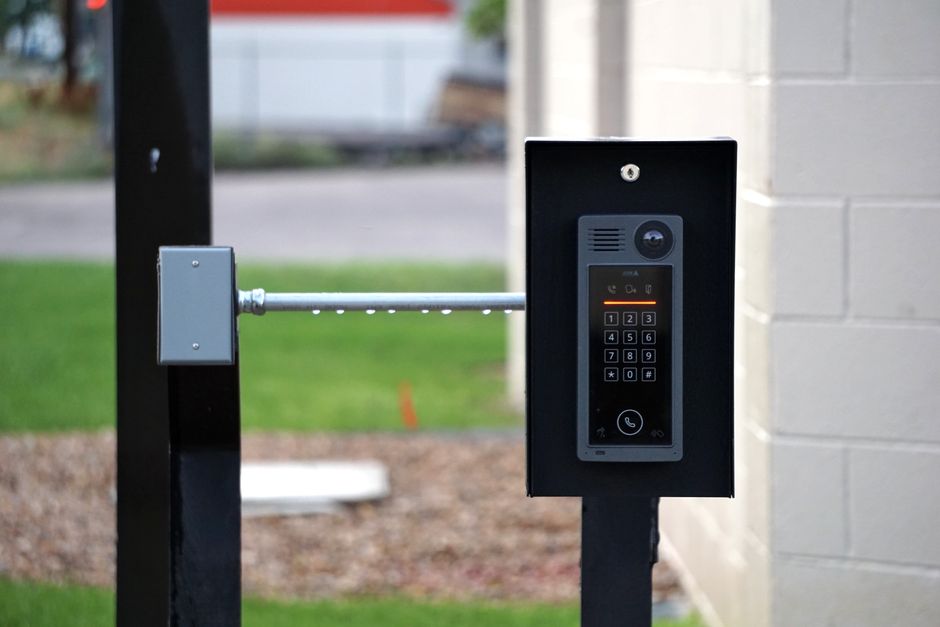
Two Australian scenarios and how the checklist fixes them
Scenario 1: Sydney strata rush that filled forms, not vans. A small intercom installer running Search across Greater Sydney saw CPL drop to what looked like a win on paper. Digging into search terms showed heavy traffic on generic “security installation” and brand-plus-manual queries. The landing page was a general security homepage. Calls were tracked, but 40-second hang-ups still counted. The fix path:
-
Split a dedicated “apartment intercom repair / door entry fault” campaign with tight geos around councils they could reach same day.
-
Add negatives for CCTV-only, alarms-only, and DIY kit language.
-
Move ads to a repair-specific page with photos of common handset failures and a click-to-call sticky bar.
-
Raise the call conversion threshold and stop counting sub-qualifying calls as primary.
-
Import booked site visits weekly so bidding shifted toward property-manager style callers.
The mechanism that mattered was not a clever bid modifier. It was stopping the algorithm from celebrating junk calls while the diary stayed empty. Cost per booked job became the steering wheel within a few weeks of clean data, not overnight magic.
Scenario 2: Brisbane planned upgrades with slow follow-up. Another team sold video entry upgrades for townhouses and small commercial sites. Ads ran broad hours. Enquiries peaked after 6pm when the owner was still on tools. By morning, two competitors had already quoted. Audit moves:
-
Daypart expensive exact-match install terms to staffed windows; keep a cheaper remarketing or lighter presence after hours only if SMS callback was truly covered.
-
Shorten the form to suburb, system type (audio/video/unknown), and urgency; push phone as primary during the day.
-
Add ad copy that stated callback windows honestly so expectations matched capacity.
-
Use recordings to find that users never scrolled to accreditation logos buried below long brand story copy; move proof above the fold.
Booked rate climbed when response design and page proof caught up with the keywords they were already buying. Spend did not need to double. Leakage needed to stop.
What we hear from installers running these audits
We cut a third of our search terms after the audit and CPL went up slightly, but cost per booked intercom job in Melbourne dropped because we stopped paying for CCTV tyre-kickers. - pattern we hear from owners running intercom installation businesses in Victoria
The break was response time, not CPC. Once expensive fault keywords only ran when someone could answer within ten minutes, Google Ads started filling the week again. - pattern we hear from operations leads in door entry and access across Queensland
30-day action plan you can run without boiling the ocean
Days 1 to 3: freeze major structure changes long enough to baseline. Export search terms, mark bookable versus junk, and list every conversion action that currently feeds Smart Bidding. Kill or relegate junk conversions.
Days 4 to 10: ship negatives, geo clean-up, and ad group splits for repair versus install versus multi-unit. Rewrite RSAs so each theme promises a concrete job outcome and a proof point (licenced, insured, brands, strata experience). Align landing sections or dedicated pages the same week; do not wait for a full redesign if you can clarify headline, proof, and CTA now.
Days 11 to 20: implement or repair call tracking, minimum call length, and offline conversion import for booked jobs. Review missed-call rate with whoever answers the phone. Adjust ad schedules to real coverage. Watch mobile landing behaviour and form fields that cause abandon.
Days 21 to 30: only then revisit bidding strategies and budgets. Expand exact coverage on terms that produced booked work. Write a one-page weekly report format your installer leads will read. Decide what stays paused permanently (out-of-area, pure DIY, wrong trade) so the account cannot quietly regress.
Expect learning noise when you change conversion definitions. That is normal. What you should not expect is a guaranteed CPL from anyone who has not seen your unit economics, travel time, and close rates. Sustainable paid search for intercoms in Australia is a program of query control, proof, speed, and feedback loops, not a single campaign toggle.

Free tools
DIY free tools for this playbook
Run these on the pages and campaigns this article covers, then fix what they flag before you scale spend or content volume.
Run these on this playbook
If the checklist shows a leak you cannot close in-house, request a free marketing audit.
Frequently asked questions
What should I optimise for first: CPL or cost per booked job?
Cost per booked job. CPL is a diagnostic. If cheap leads never become site visits, Smart Bidding will keep buying more of the wrong intent. Tie imports or careful CRM status back into Google when you can.
Should intercom companies in Australia use Performance Max?
Only after Search query control and conversion quality are solid. PMax can extend reach, but it will spend into weak signals and broad inventory if your primary conversions are messy. Keep clear creative and strong brand assets if you turn it on. In smaller Australian markets like Adelaide or regional NSW, PMax often exhausts the relevant in-market audience quickly and bleeds into Display-monitor impression share by network from week one.
How tight should location targeting be?
As tight as your profitable travel radius. Paying for clicks from cities you only “sometimes” cover is a common AUD leak. Use presence-based targeting and honest service-area copy.
Do I need separate campaigns for strata and residential?
Usually yes when ticket size, proof, and sales cycle differ. Strata and facilities buyers respond to compliance, multi-door experience, and reliability language that residential fault ads do not need.
How often should negatives be reviewed?
Weekly while cleaning a messy account, then at least fortnightly once stable. New junk queries appear as Google expands matching. Treat negatives as operating hygiene, not a one-off project.
Putting it to work
Pull the last 60 days of Google Ads search terms and line them up against booked jobs in your calendar or job software; tag every spend cluster as bookable, wrong trade, DIY, or out of area, and add the obvious negatives before you raise a single budget.
If you want a partner to own the ongoing audit loop for google ads for intercoms australia, from intent structure and negatives through landing-page match, call quality, and cost per booked job, HeyLead can run that SEM program with you so you stay focused on installs and strata relationships. Start the conversation at [email protected].
Free marketing audit, or reach Martin directly:
Get a free audit Chat with us on WhatsApp · [email protected]